


If you’re searching for a “zigbee cob led strip,” it usually helps to reframe the question: COB describes the strip’s lighting appearance (a more continuous, “dotless” line), while Zigbee describes how the lighting is controlled (typically via a controller that joins a Zigbee network). For projects in the US, most procurement and commissioning problems come from mismatching strip type, controller mode/channels, power/wiring plan, or hub/platform compatibility.
A “Zigbee COB LED strip” is usually a system: a COB LED strip (the lighting load) controlled by a Zigbee LED strip controller, which may connect through a Zigbee hub/gateway depending on the ecosystem.
What each part does (strip vs controller vs hub)
3 checks before you specify or order
Boundary conditions (important)
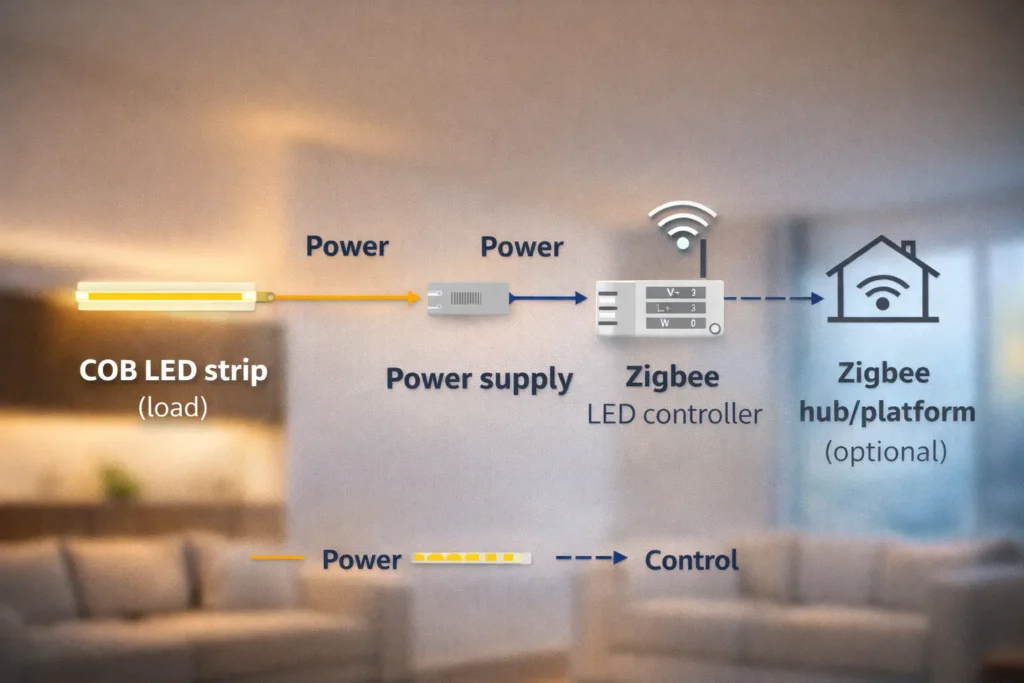
In most real-world installations, Zigbee strip control is channel-based (dimming and color channel control), not true per-pixel animation control. If your requirement is “pixel effects,” confirm the control method early—this is one of the most common causes of wrong purchases.
| Requirement / Outcome | Typical Zigbee strip setup (channel-based) | Addressable (pixel) control setup |
|---|---|---|
| Dimming | Yes (as supported by controller + strip type) | Yes |
| Tunable white (CCT) | Yes, with a CCT-capable controller | Yes (depends on system) |
| Color (RGB/RGBW/RGBWW) | Yes, with matching controller channels/mode | Yes |
| Per-pixel chasing/rainbow animations | Usually not the goal or capability of Zigbee channel control | Yes (requires pixel-capable control) |
| Procurement risk | Wrong controller mode/channels, hub incompatibility | Wrong pixel protocol, wrong controller/software |
Boundary conditions
Controller choice is driven by strip channel type. The fastest way to reduce commissioning problems is to map “what you’re controlling” to “how many channels/modes the controller must support,” then verify wiring and documentation before ordering.
| COB strip type | What you’re controlling | Typical controller requirement | What to verify before ordering |
|---|---|---|---|
| Single color | Brightness only | 1-channel dimmer/controller mode | Output type matches strip; wiring terminals; dimming behavior suits the application |
| CCT (tunable white) | Warm + cool channels | 2-channel CCT controller mode | CCT mode supported; correct channel mapping; pairing/reset steps available |
| RGB | R, G, B channels | 3-channel RGB mode | RGB mode supported; wiring diagram; platform device support for RGB control |
| RGBW | RGB + dedicated white | 4-channel RGBW mode | RGBW vs RGBWW distinction; terminal map; correct device type exposure in your platform |
| RGBWW / RGBCCT | RGB + warm + cool whites | 5-channel RGBWW/RGBCCT mode | Mode naming varies by vendor; confirm exact supported mode and wiring diagram |
Procurement checks that prevent the most rework
Missing documentation is one of the biggest reasons projects lose time during commissioning. Before you commit to a controller SKU, request or confirm these items:
Must-have documentation (minimum)
Red flags
Control stability depends heavily on power distribution and wiring quality, not just the wireless protocol. Plan the system as a set of zones and feed points so the strip sees consistent power and the controller sees predictable loads.
A practical planning sequence (project-friendly)
Before you order: a checklist that reduces surprises
Common pitfalls that show up as “unstable dimming”
| Pitfall | What it looks like on site | What to do instead |
|---|---|---|
| Long runs fed from one end only | Uneven brightness, inconsistent dimming | Plan segmentation and power distribution points |
| Weak/loose terminations | Flicker, intermittent behavior | Use secure terminations and verify continuity |
| Unclear channel mapping (CCT/RGBW/RGBWW) | Wrong colors or inverted warm/cool behavior | Follow the controller wiring diagram and label channels |
| Commissioning everything at once | Hard to isolate faults | Commission one zone at a time and record results |
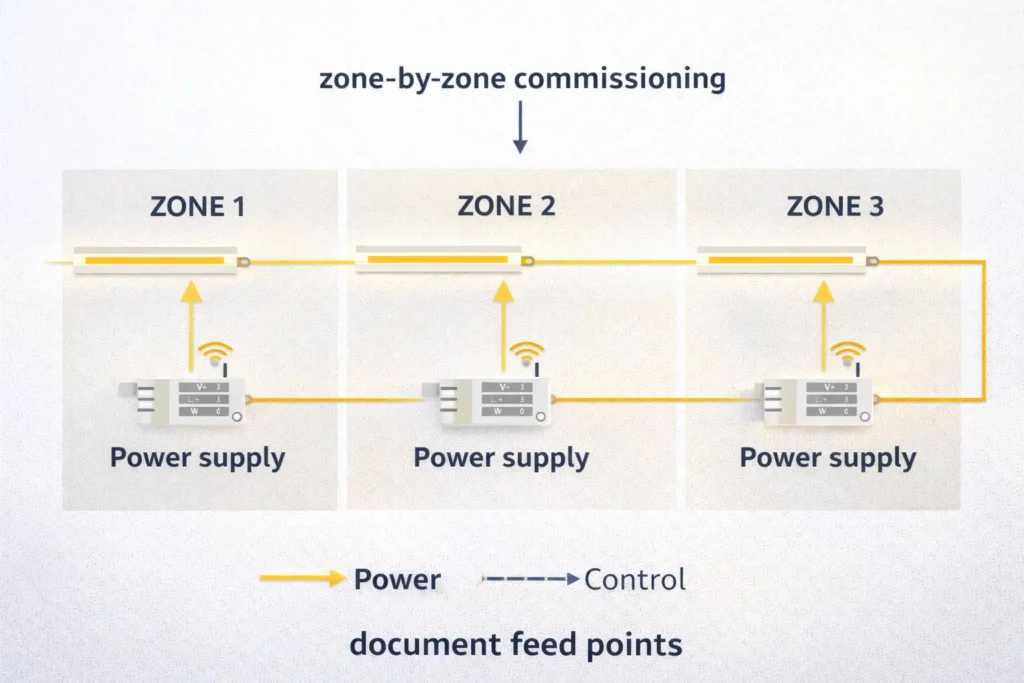
Long runs require distribution planning because voltage can drop along a strip and wiring, which can show up as uneven brightness or inconsistent dimming across the run.
What to watch for
Conceptual ways projects address this
Boundary condition: There are no universal run-length rules here because results depend on the strip design, wiring choices, layout, and installation conditions. Use datasheets and the project layout to validate the plan.
A Zigbee label alone does not guarantee interoperability across every hub/app. Procurement should treat compatibility as a verification checklist: confirm what hub/platform will be used, then validate that the controller is supported and exposes the needed controls (dimming, CCT, RGBW/RGBWW, etc.).
Compatibility verification checklist
Red flags
Official references (for terminology + integration verification)
Commissioning goes faster when you treat it like a repeatable process with documentation—not a one-off “app setup.” The exact button sequence varies by controller model, but the workflow is consistent.
Typical commissioning workflow
Commissioning checklist (handover-friendly)
Boundary condition: Do not guess model-specific reset steps. Always use the controller’s manual for the exact procedure.
Most issues trace back to power distribution, wiring, or configuration mismatch—not Zigbee itself. A structured “symptom → likely cause → verify first” approach reduces trial-and-error.
| Symptom | Likely causes | Verify first |
|---|---|---|
| Flicker or blinking | Loose termination, unstable power feed, mode mismatch | Re-check terminations; confirm controller mode matches strip type; test a shorter segment |
| Uneven dimming along a run | Power distribution issue, long-run effects | Confirm feed points and zoning; test behavior near/far from the feed point |
| Wrong colors / warm-cool reversed | Channel mapping error (CCT/RGBW/RGBWW) | Follow the wiring diagram and terminal map; label channels |
| Dropouts or intermittent response | Commissioning inconsistencies, network placement issues, power instability | Confirm pairing success and device behavior in the hub; verify stable power and consistent zone testing |
| One zone behaves differently | Zone-specific wiring or power distribution differences | Isolate the zone; compare wiring and feed points against the plan |
Prevention checklist
Boundary condition: Do not cite numeric “flicker” thresholds without verified datasheets. If the application is camera-critical, require controller documentation and project-specific verification.
Kits can be helpful for standardization, while specifying strip + controller separately can reduce ambiguity for custom projects. The best choice depends on who owns commissioning and how strictly the project must match a standardized ecosystem.
| Decision factor | Kit approach | Components approach (strip + controller specified) |
|---|---|---|
| Standardization | Easier to repeat a known bundle | Easier to standardize by spec across vendors and projects |
| Flexibility | Limited to what the kit includes | High (choose strip type, controller mode, documentation pack) |
| Compatibility risk | Lower if the kit is truly validated as a set | Manageable if you verify controller support and platform integration |
| Documentation clarity | Varies by kit | Can be made explicit on the PO/spec sheet |
| Replacement strategy | May require the same kit | Individual components can be replaced with controlled substitutions |
Choose a kit when
Choose components when
Boundary condition: “Kit” contents vary widely. Confirm exactly what’s included (controller, power supply, connectors, any hub requirements) before you treat it as standardized.
A complete PO/spec sheet reduces delays, prevents substitutions that break compatibility, and makes commissioning predictable. Treat this as a minimum information pack.
Load (strip)
Control system
Power and wiring
Documentation and acceptance
Common missing items that cause rework
If you want a procurement-ready recommendation for a project, prepare:
Then request a configuration proposal and documentation pack (wiring diagram + controller mode guidance) before bulk ordering.
Environment affects both the strip selection and where the controller should live.
Q: Do COB LED strips have Zigbee built in, or do I need a Zigbee controller?
A: Most COB LED strips do not have Zigbee built in—Zigbee is typically provided by the controller. Treat “Zigbee COB strip” as a system: strip + Zigbee controller + (often) a hub/platform. Always verify the controller supports your strip type (single/CCT/RGB/RGBW/RGBWW) and your chosen ecosystem.
Q: Do I need a Zigbee hub/gateway for a Zigbee LED strip controller?
A: It depends on the ecosystem—many Zigbee setups require a hub/gateway to manage devices and automation. Before ordering, confirm the project’s target hub/platform and verify the controller is supported and exposes the controls you need (dimming/CCT/color channels).
Q: Can Zigbee control addressable/pixel effects on COB LED strips?
A: Typically, Zigbee strip control is channel-based (dimming and color channels), not true per-pixel animation control. If “effects” are required, clarify whether you mean scenes/transitions or pixel-level behavior, then select a control approach designed for that requirement.
Q: How do I choose the right controller type for CCT vs RGBW/RGBWW COB strips?
A: Choose the controller by channel type: CCT needs a controller mode designed for two white channels, while RGBW/RGBWW requires additional channels and correct wiring. Mode naming varies, so verify the exact supported mode and wiring diagram for the controller SKU you’re buying.
Q: Why is my Zigbee-controlled strip flickering or dimming unevenly?
A: Flicker and uneven dimming are most often caused by wiring/termination issues, power distribution planning problems, or a controller mode mismatch. Start by verifying secure terminations, confirming the controller mode matches the strip type, and testing one zone/short segment to isolate the cause before scaling up.
Q: Should I buy a Zigbee COB strip kit or specify strip + controller separately for a project?
A: Kits can reduce friction for standardized installs, while specifying components separately is better for custom projects with strict ecosystem and documentation requirements. Because kit contents vary, confirm what’s included and who owns commissioning/support before you standardize on a kit approach.
A “Zigbee COB LED strip” is best specified as a system. If you only remember three things, make them these:
What to send to get a correct configuration
For project support and customization, share the above inputs so a complete configuration and documentation pack can be prepared before procurement and installation.



 English
  Spanish
  French
  Arabic

