In many projects, addressable LED strips let a project show moving color, pixel effects, and zones instead of one static color across the whole strip. As a result, each LED, or each small LED group, can be set on its own, based on the strip design and IC.
However, buyers should not choose by the strip name alone. First, check the controller, signal type, voltage, color format, run layout, and install site. Then, match those details with the supplier’s strip options. In this way, the buyer can compare real project needs instead of guessing from a model name.
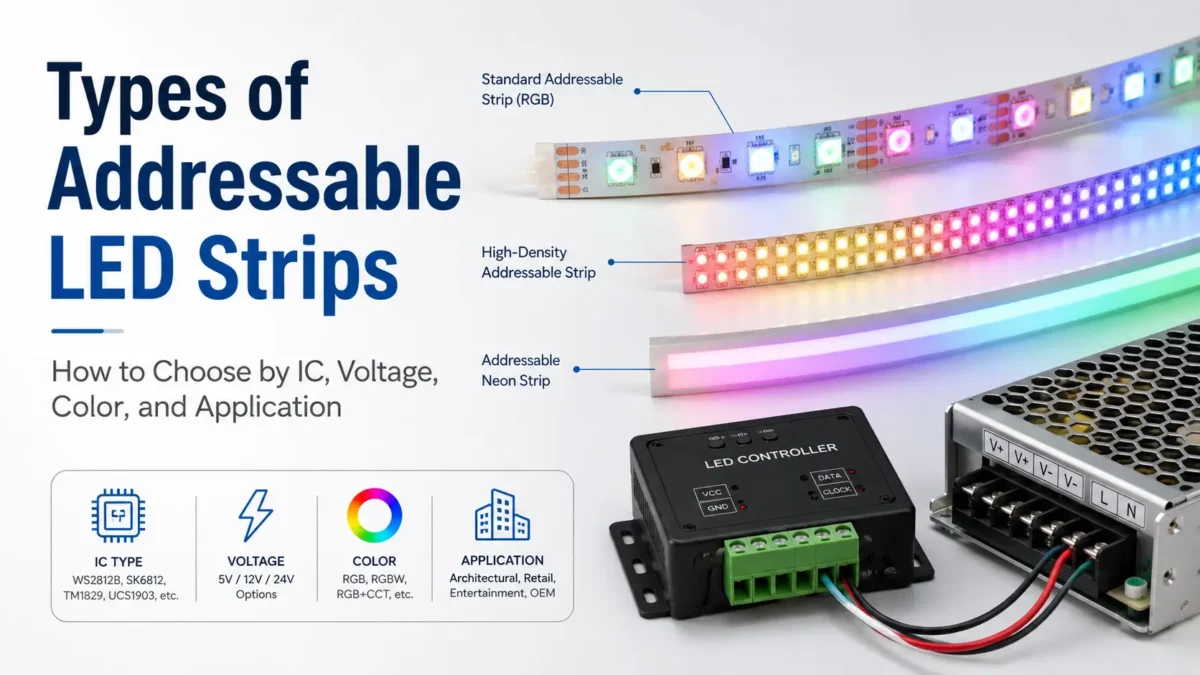
In practice, addressable LED strips are best grouped by IC or control type, voltage, color format, LED count, pixel unit, strip form, and use site. However, no one type fits every job. First, check the controller and signal. Next, review voltage, power, color needs, run length, and indoor or outdoor use before you ask for a quote.
To start, review the choice factors below. As a result, you can compare strip types without treating one option as the “best” in every case.
| Type Factor | Common Options | Why It Matters | Buyer Check |
|---|---|---|---|
| IC / control type | Data-line chips, clock/data chips, and control systems | Shows how the strip talks to the controller | Check that the controller supports the chip or signal type |
| Voltage | 5V, 12V, and 24V options | Affects power supply choice and run plan | Check voltage, full length, wiring, and power supply size |
| Color format | RGB, RGBW, and other color setups | Affects color control and setup | Check that the controller supports the color format |
| LED count and pixel unit | Different LED counts and addressable segment sizes | Affects detail, effect look, and power plan | Check view distance and effect detail |
| Strip form | Flexible SMD, diffused or neon-style, COB-style, and custom forms | Affects look, bend, and mount method | Check space, bend path, surface, and light look |
| Use site | Indoor, damp, outdoor, or protected spaces | Affects housing and install needs | Tell the supplier the real site, not just the product name |
In short, use this table as a guide, not a fixed rank. For example, a strip that works well in a display may not fit a long run, a damp site, or a fixed controller.
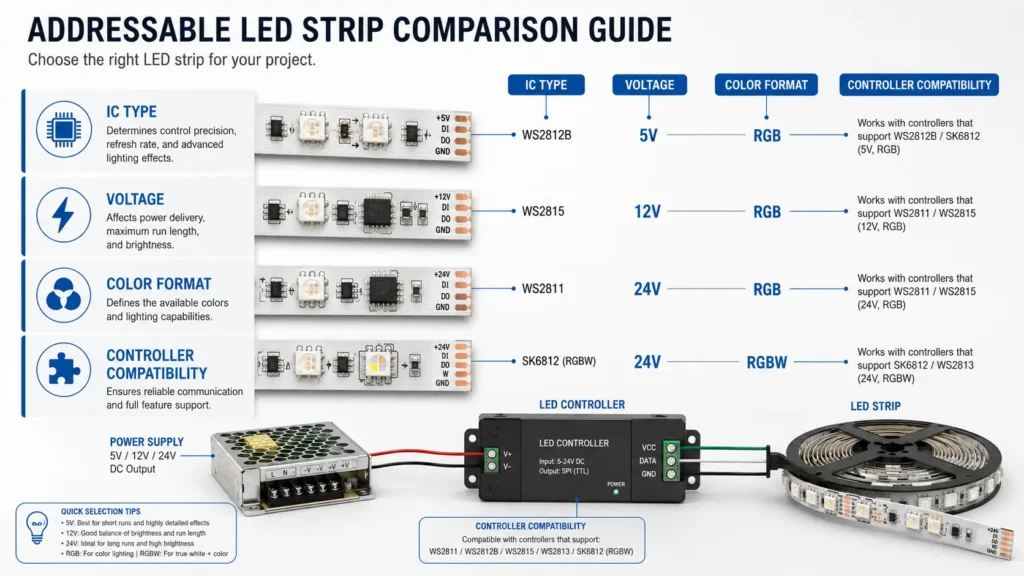
First, check the IC or control family. For example, you may see names such as WS2811, WS2812B, SK6812, and APA102-style strips.
Also, treat these names as guide posts, not as a full spec. In addition, a chip name can affect the signal, wire style, voltage options, color format, and controller fit. However, it does not tell you the whole project fit by itself.
Before you choose, ask these simple questions:
Therefore, do not choose by IC name alone. In addition, the same job may also need the right voltage, LED count, strip width, cover, wire, and power plan.
Next, compare voltage. For example, many projects use 5V, 12V, or 24V addressable strips, yet voltage by itself does not decide the right strip.
Instead, review voltage with the full run length, LED count, power supply, wire route, controller spot, and install site. Therefore, the power plan should be checked before the order is placed.
For more background, see Adafruit’s NeoPixel power guidance. Still, the final power supply and wiring plan should be checked for the real project layout.
| Check Item | Why It Matters |
|---|---|
| Strip voltage | It must fit the power supply and control setup. |
| Total length | It affects wire and power planning. |
| LED count | More LEDs can need more care in the power plan. |
| Pixel unit | It shows how much of the strip is controlled at once. |
| Power supply size | It must fit the load and layout. |
| Wire route | Long or complex routes need review. |
| Controller spot | It affects signal and install planning. |
| Use site | Outdoor or protected spaces may need a different build. |
In other words, do not assume that higher or lower voltage is always better. Instead, choose voltage after the layout is clear.
Then, check the color format. For example, RGB strips control red, green, and blue. In contrast, RGBW strips add a white channel.
However, RGBW is not just “RGB plus more light.” Instead, it needs a controller and setup that can use the white channel. As a result, RGB and RGBW should be listed clearly in the RFQ.
Before you choose the color format, ask:
Also, do not use color format as a quality claim. It is a fit choice that depends on the look and the control setup.
After that, check LED count and pixel unit. Also, LED count affects the look and the power plan. Meanwhile, pixel unit means how much of the strip works as one controlled part.
For example, some strips let each LED act on its own. Others control a small group as one part. This can change how smooth or detailed an effect looks.
Strip form also matters. For instance, a flexible SMD strip, a diffused strip, a neon-style strip, and a COB-style strip may look and mount in different ways. However, the strip still needs to fit the controller, voltage, color format, and site.
Before you choose density or form, confirm:
In short, choose the form after you know both the visual goal and the system needs.
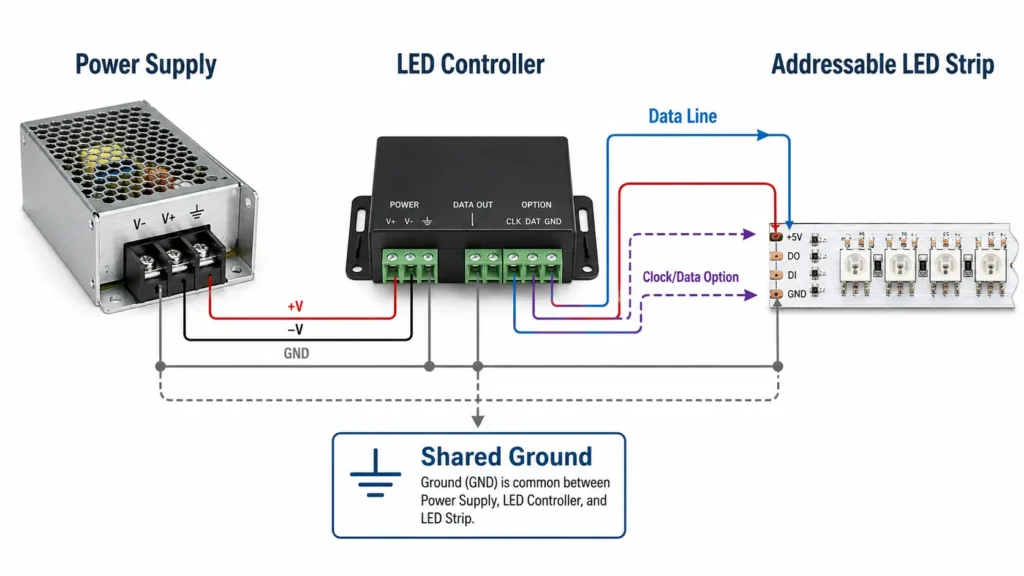
Most importantly, do not assume any controller can run any strip. Instead, the strip and controller must fit in chip support, signal type, voltage, color format, and setup.
For example, one strip may use a single data line, while another may use clock/data wiring. Also, RGBW strips may need a different setup from RGB strips.
For more background, review ELSTARLED’s LED strip programming guide and the WLED compatible LED strips reference. However, use these as general fit checks, not as proof that every strip works with every controller.
| Check | What to Confirm |
|---|---|
| Chip / IC | Does the controller support this strip type? |
| Signal type | Is it one-data-line or clock/data style? |
| Voltage | Do the strip, controller, and power supply fit the same plan? |
| Color format | Is it RGB, RGBW, or another setup? |
| Pixel setup | Can the controller be set for the strip? |
| Wire layout | Are power and signal routes suitable for the site? |
| Project size | Does the controller fit the needed pixel or segment count? |
Therefore, if the controller is already chosen, send its model or supported chip list with the RFQ.
After the core specs are clear, match the strip to the use case. As a result, the buyer can avoid a strip that looks right on paper but does not fit the site.
| Use Case | Main Choice Point | Strip Traits to Review | What to Confirm |
|---|---|---|---|
| Signage and channel letters | Fit, effect, and install method | Voltage, LED count, segment control, width, and site need | Sign size, layout, controller, power access, and indoor or outdoor use |
| Building accent light | Smooth look and easy mount | Density, cover, voltage, run layout, and mount surface | View distance, bend path, surface, and color format |
| Stage, display, or event effect | Effect detail and control fit | IC/control type, pixel unit, and controller fit | Controller type, effect needs, pixel count, and power plan |
| OEM or custom light product | Repeat fit and build needs | Voltage, IC, PCB width, wire, plug, and custom needs | Drawings, samples, space, and test needs |
| Outdoor or protected install | Site exposure and wire plan | Protection level, seal method, cable, and connector plan | Actual site, mount method, exposure, and needed documents |
As a result, final selection should be based on the real layout, not only the product title.
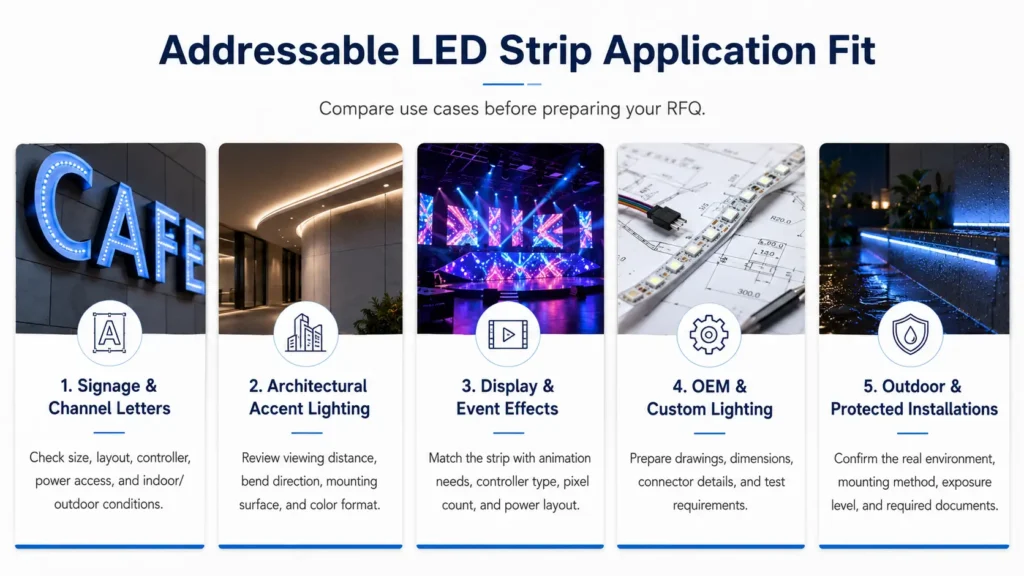
Before you order, check the points that often cause a mismatch. Although this step is simple, it can save time during sample review and install planning.
| Risk | Why It Matters | Safer Action |
|---|---|---|
| Wrong controller or chip support | The strip may not respond as planned. | Check chip and signal support before purchase. |
| Voltage mismatch | The power supply, controller, and strip must fit one plan. | Check voltage and power together. |
| RGB/RGBW setup mismatch | A white channel needs the right control setup. | State the color format clearly in the RFQ. |
| Unclear run layout | Length, LED count, and wire route affect the system plan. | Share a drawing or total run details. |
| Choosing by “best” claims | No strip type fits every job. | Compare by use case, controller, voltage, and site. |
| Unclear site protection need | Indoor and outdoor jobs may need a different build. | Describe the real site. |
| Missing custom details | The supplier may not be able to review fit. | Send drawings, size limits, plugs, wires, and quantity. |
Also, do not assume the claims below from a general guide. Instead, ask the supplier to confirm them for the exact product and order.
Because of this, buying teams should keep these items as proof checks, not as assumed facts.
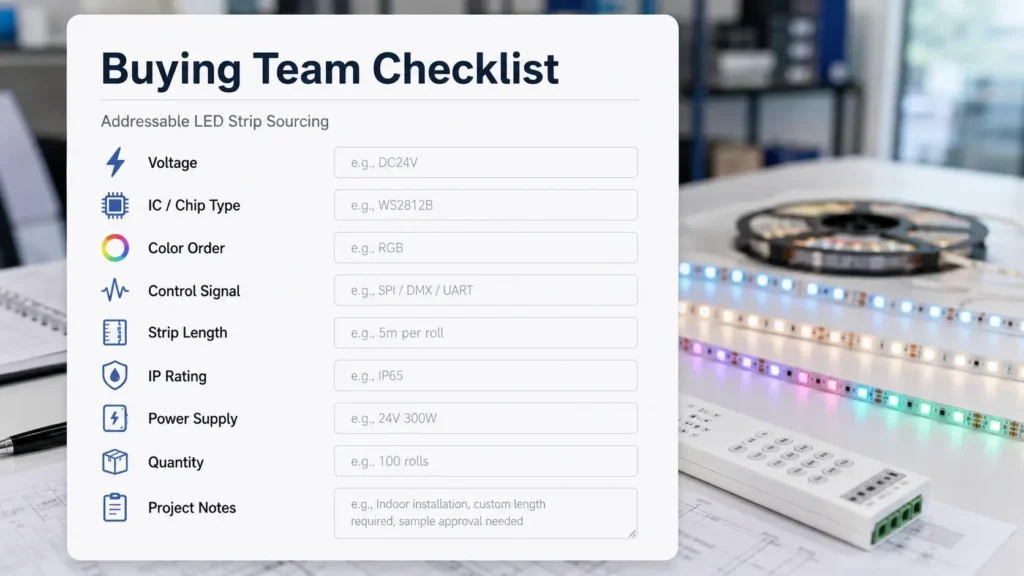
Finally, make the RFQ clear. Instead of asking only for “addressable LED strip price,” send the details that affect fit. As a result, the supplier has enough context to review the right strip type.
For more buying help, review ELSTARLED’s LED strip manufacturer selection and RFQ guide. In addition, if the job needs custom length, wire, plug, label, pack, or strip form review, use the customization page as the next internal page.
| Information to Provide | Example Detail to Prepare |
|---|---|
| Use case | Sign, building accent, display effect, OEM product, retail fixture, or outdoor job |
| Install site | Indoor, damp, outdoor, protected channel, or exposed area |
| Voltage | 5V, 12V, 24V, or “please suggest after layout review” |
| IC / controller need | Controller model, supported chip, or needed signal type |
| Color format | RGB, RGBW, or another setup |
| LED count / visual goal | Effect detail, view distance, dot-free look, or visible-dot look |
| Length and layout | Total length, segment length, wire route, and drawing if ready |
| Protection need | Known IP need or a clear note about the site |
| Quantity | Sample amount and likely project amount |
| Custom needs | PCB width, plug, wire length, tape, pack, label, or special form |
| Documents needed | Datasheet, test data, certificate files, or other buying files if needed |
As a result, the supplier can compare the right options and avoid weak guesses.
In general, they can be grouped by IC or control type, voltage, color format, LED count, pixel unit, strip form, and use site. However, for B2B buying, controller fit and project layout are often more useful than the product name alone.
Usually, these names point to chip or control families. For example, they may differ in signal type, wire style, voltage options, color setup, and controller fit. Therefore, treat them as choice factors, not as a fixed best-to-worst list.
Yes. However, voltage is only one part of the system plan. The right choice also depends on strip design, total length, power supply, wire route, controller setup, and install site.
No. Instead, the controller must support the strip chip or signal type, wire style, voltage plan, and color format. If you already have a controller, send its model or supported chip list before you choose the strip.
For RGB strips, the controller handles red, green, and blue. In contrast, RGBW strips add a white channel. Therefore, RGBW needs a controller and setup that can use the white channel.
Yes, they can differ in form, look, diffusion, bend, and mount method. However, the final choice still needs to fit voltage, controller, color format, site, and layout. Therefore, use the form as one choice factor, not the only choice factor.
There is no single best type for every commercial job. Instead, choose by use case, controller, voltage, color need, site, project size, and the files your buying team needs.
First, prepare the use case, site, voltage, IC or controller need, color format, LED count, length and layout, protection need, quantity, custom needs, and needed files. Also, send drawings or photos when they are available.
In addition, use these links to keep product browsing, RFQ work, controller checks, and power review in one place. However, external links are technical references, not proof of ELSTARLED product claims.
After you know the main strip types, match the strip to your real job. Then, send the details that affect fit. As a result, the review can focus on the right strip options.
Next, share the use case, controller or IC need, voltage, color format, strip length, layout, site, quantity, and custom needs. ELSTARLED can review the details and help you compare suitable addressable LED strip options.
For product browsing, visit the addressable LED strip category. For project review, prepare your RFQ details before using the ELSTARLED contact page. Finally, for custom strip needs, start with the customization page.


 English
  Spanish
  French
  Arabic